How To Convert TM Sim To Esim?
If you are a TM subscriber looking to upgrade your physical SIM to an eSIM, you’re in the right place. Many TM users face challenges in understanding the process and requirements for this conversion. An eSIM, or embedded SIM, allows you to activate your mobile plan digitally without a physical card, giving you flexibility, convenience, and faster activation.
This guide will walk you through everything you need to know about how to convert your TM SIM to eSIM, step by step.
What Is An eSIM
An eSIM is a digital SIM embedded in your device that lets you activate your TM plan without a physical SIM card. It works the same way as a traditional SIM but offers added benefits:
- Instant activation without visiting a store
- Dual SIM functionality for personal and work numbers
- Easier management of multiple carriers
Benefits Of Converting Your TM SIM To eSIM
Converting your TM SIM to eSIM provides several advantages:
Convenience: You can switch devices without swapping SIM cards.
Security: No physical card reduces the risk of loss or damage.
Travel-friendly: Easily manage international plans without replacing SIMs.
Eligibility Requirements
Before converting your TM SIM to eSIM, ensure you meet the following requirements:
- Active TM mobile number
- Compatible smartphone with eSIM support (iPhone XS or later, Samsung Galaxy S20 or newer, Google Pixel 3 or newer)
- Valid ID for verification (government-issued ID or passport)
TM allows subscribers to replace lost sim with same number when switching from a physical SIM to an eSIM.
Guide To Convert TM SIM To eSIM
Switching from a physical TM SIM to an eSIM is a quick and convenient way to manage your mobile number digitally. With an eSIM, you don’t need a physical card, making it easier to switch devices or use multiple numbers. Follow this step-by-step guide to convert your TM SIM to eSIM hassle-free using the GlobeOne app.
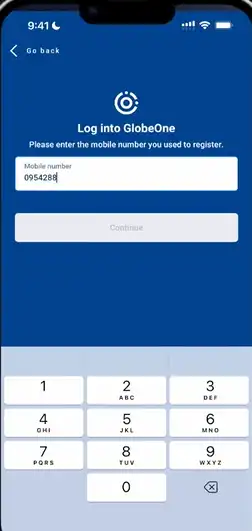
1. Download the GlobeOne app from Google Play Store if you don’t have it.
Open the app and log in to your account.
Note: If the eSIM setup isn’t proceeding, checking TM sim register first can help confirm your SIM is properly registered.
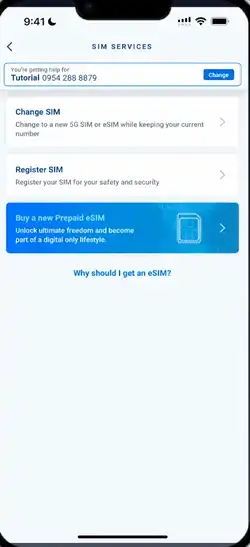
2. After login, you will see the dashboard.
Tap on SIM Services to access available SIM-related options.

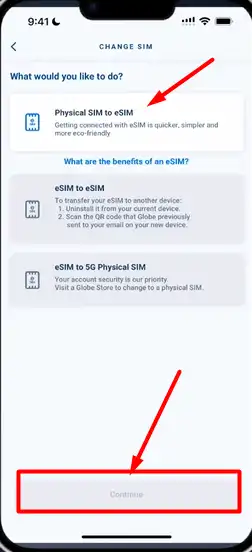
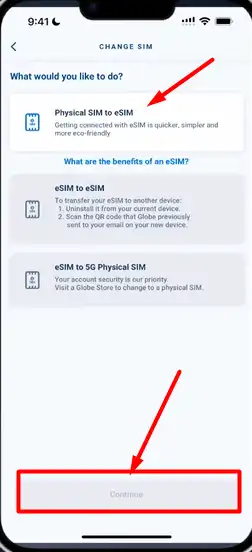
3. Choose the first option “Change SIM”.
You will see three options; select Physical SIM to eSIM and tap Continue.
4. Read the terms and conditions carefully.
Tap Continue to proceed.
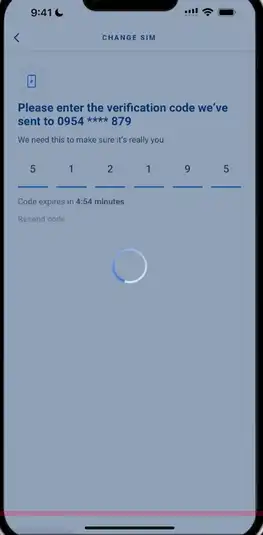
5. You will receive an OTP code on your mobile number.
Enter the OTP to verify your number.
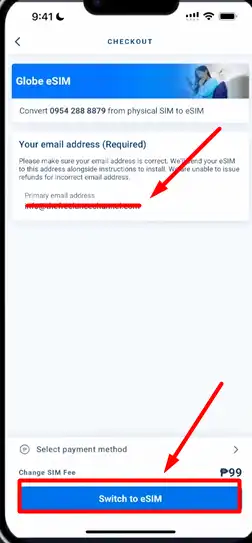
6. Enter your primary email address.
Tap Switch to eSIM to continue.
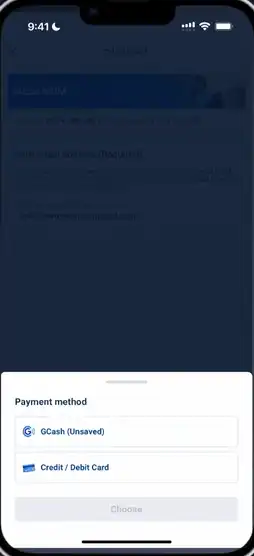
7. A fee is required to convert your SIM to eSIM.
Payment options: GCash or Credit/Debit Card.
Recommended: Use Credit/Debit Card, enter card details, and tap Proceed.
If using GCash, verify your PIN to complete the payment.
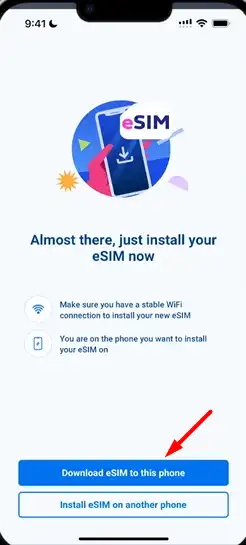
8. Once payment is successful, you will receive a link to install your eSIM.
Tap Download eSIM in this phone.
Wait a few seconds, and the eSIM will be installed on your device.
Tips For A Smooth Conversion
- Back up your contacts and messages before conversion.
- Keep your TM account credentials handy.
- Ensure stable internet connection when scanning QR code.
- Visit an authorized TM store if you prefer in-person assistance.
FAQs
What devices support TM eSIM?
TM eSIM supports most modern smartphones with eSIM capability. Check the TM official website for a full list of compatible devices.
How long does it take to convert TM SIM to eSIM?
The conversion process usually takes 10–30 minutes if done at a TM store or online, provided all verification steps are completed.
Can I revert back to physical SIM after switching to eSIM?
Yes, TM allows reverting back to a physical SIM by visiting a TM store and requesting a SIM replacement.
Is there any cost to convert TM SIM to eSIM?
TM may charge a nominal fee for eSIM conversion. Confirm with customer service before initiating.
Can I use eSIM and physical SIM simultaneously?
Yes, most eSIM-supported devices allow dual SIM functionality, letting you use both your eSIM and physical SIM at the same time.
Do I need internet to activate TM eSIM?
Yes, you need a stable internet connection to scan the QR code and complete the activation process.
Are international roaming plans supported on TM eSIM?
Yes, eSIM supports international roaming, and you can manage your roaming settings directly from your device.
Converting your TM SIM to an eSIM is a convenient and modern way to manage your mobile plan. By following the steps above and ensuring your device compatibility, you can enjoy instant activation, dual SIM functionality, and secure mobile usage. Remember to verify your identity, scan your QR code carefully, and test your connection after activation. Once switched, you’ll experience the flexibility and efficiency that comes with a digital SIM, making your mobile experience seamless and hassle-free.